Adding Project CodeGuard to Claude
TL;DR: AI writes a lot of my code now, and AI-written code has a habit of skipping the boring security basics. Cisco released Project CodeGuard, a set of security rules for AI coding tools, and it is available as a “skill” you can install into Claude. I installed it in about a minute, pointed it at a small app I had VIBE coded (the Ken Burns Slideshow maker), and it helped find a real vulnerability: a folder name that could run commands on my Mac. Then I added it to the Claude app and to my AI harness, so every new project now loads it before the first line of code is written.
I have been writing about building apps by describing problems to an AI. The part I have not covered is the question that follows: how do I know the code is safe? I am not a security engineer, and the AI wrote most of it. This post is about one small, cheap answer.
What a “skill” is in agentic AI
An agent is an AI that does more than answer a question: it reads files, runs commands and finishes a task. Claude Code is one. A skill is a way to teach an agent a specialty without retraining anything. It is just a folder with a text file in it called SKILL.md, plus optional supporting files.
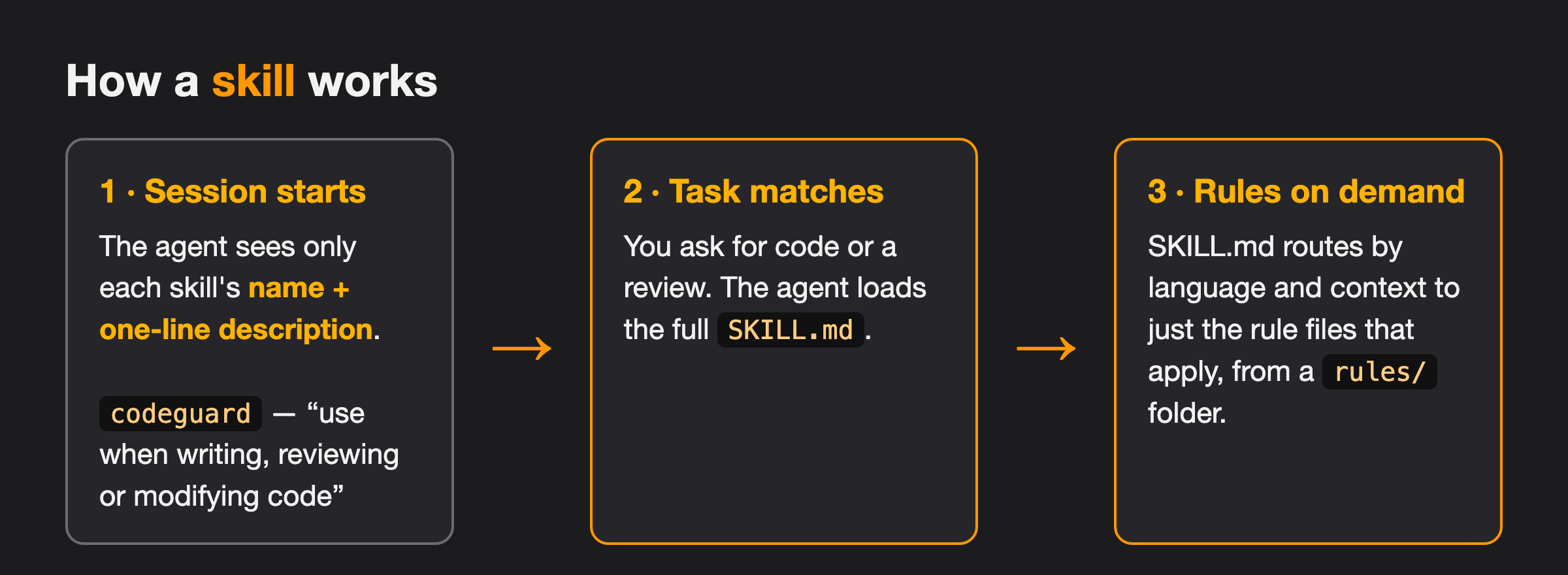
The trick is how it loads. At the start of a session the agent sees only each skill’s name and a one-line description. When my request matches (for example “review this code”), it reads the full SKILL.md, which then points it to just the extra files that apply. Nothing is loaded until it is needed, so I can install a lot of skills without filling the AI’s working memory.
There are public directories of skills. I used skills.sh, which lists them and installs them with a single command.
What Project CodeGuard is
On October 16, 2025 Cisco announced Project CodeGuard, an open-source security framework for AI-generated code. The announcement is here: Announcing a new framework for securing AI-generated code.
The problem it goes after is familiar to anyone who has VIBE coded: AI coding agents tend to produce code with insecure defaults, missing input checks, passwords written straight into files, and out-of-date cryptography. CodeGuard’s answer is a community-written set of secure-by-default rules, based on established sources such as OWASP (a well-known web security group) and CWE (a public catalogue of software weaknesses). The rules can be used before code is written (planning), while it is generated, and afterwards in a review. Cisco is careful to say it is a defense-in-depth layer, not a guarantee, and not a replacement for human review.
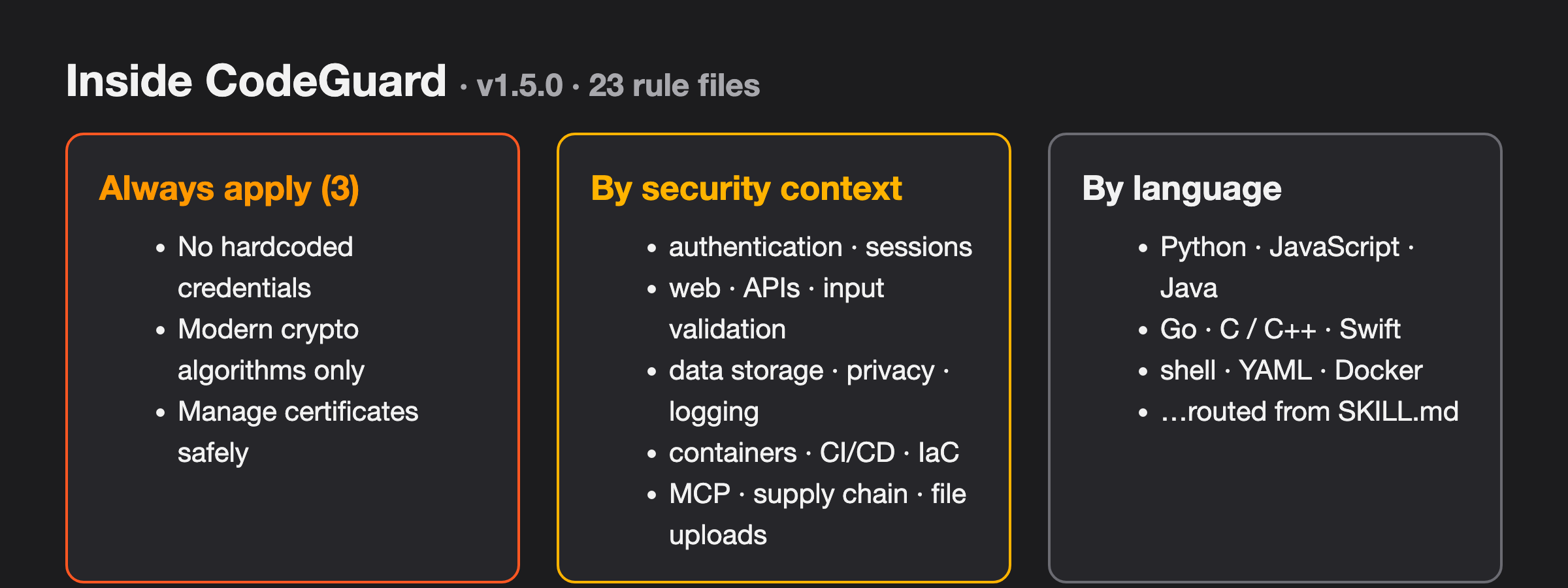
The version I installed (1.5.0) has 23 rule files. Three are always applied: no hard-coded credentials, only modern cryptography, and careful handling of certificates. The rest are picked by what the code is doing (logins, web APIs, containers, file uploads, MCP servers, supply chain) and by language.
Installing it
One warning first: searching for CodeGuard on skills.sh turns up a lot of copies and look-alikes. The one I wanted is listed as cosai-oasis / project-codeguard / codeguard, at skills.sh/cosai-oasis/project-codeguard/codeguard. That is the copy that comes from the project’s own repository. When I looked it showed 84 installs and passing results from three automated security audits (Gen Agent Trust Hub, Socket and Snyk). Those numbers will have moved by the time you read this, and the audits are a reason to look closer, not a reason to skip reading what you install. A skill is instructions your AI will follow, so it is worth ten minutes of reading.
The install is one command in the terminal:
npx skills add https://github.com/cosai-oasis/project-codeguard --skill codeguard
That put the skill in ~/.agents/skills/codeguard and linked it into ~/.claude/skills, which is where Claude Code looks. SKILL.md and the rule files are plain text you can open and read.
A quick test on a real project
My test subject was the Ken Burns Slideshow maker from the last post: drop photos in a folder, click an app, get an MP4 with a slow zoom and pan on each photo. It took about 40 minutes to build, and it was already working. It is exactly the kind of small VIBE coded tool that never gets a security look.
In Claude Code CLI I asked for a security review of the project with CodeGuard loaded. The rule I gave the session: rank the findings, reproduce each one with a harmless test before calling it real, and change nothing until I say which to fix.
What it found
One real vulnerability, plus a handful of hardening gaps.
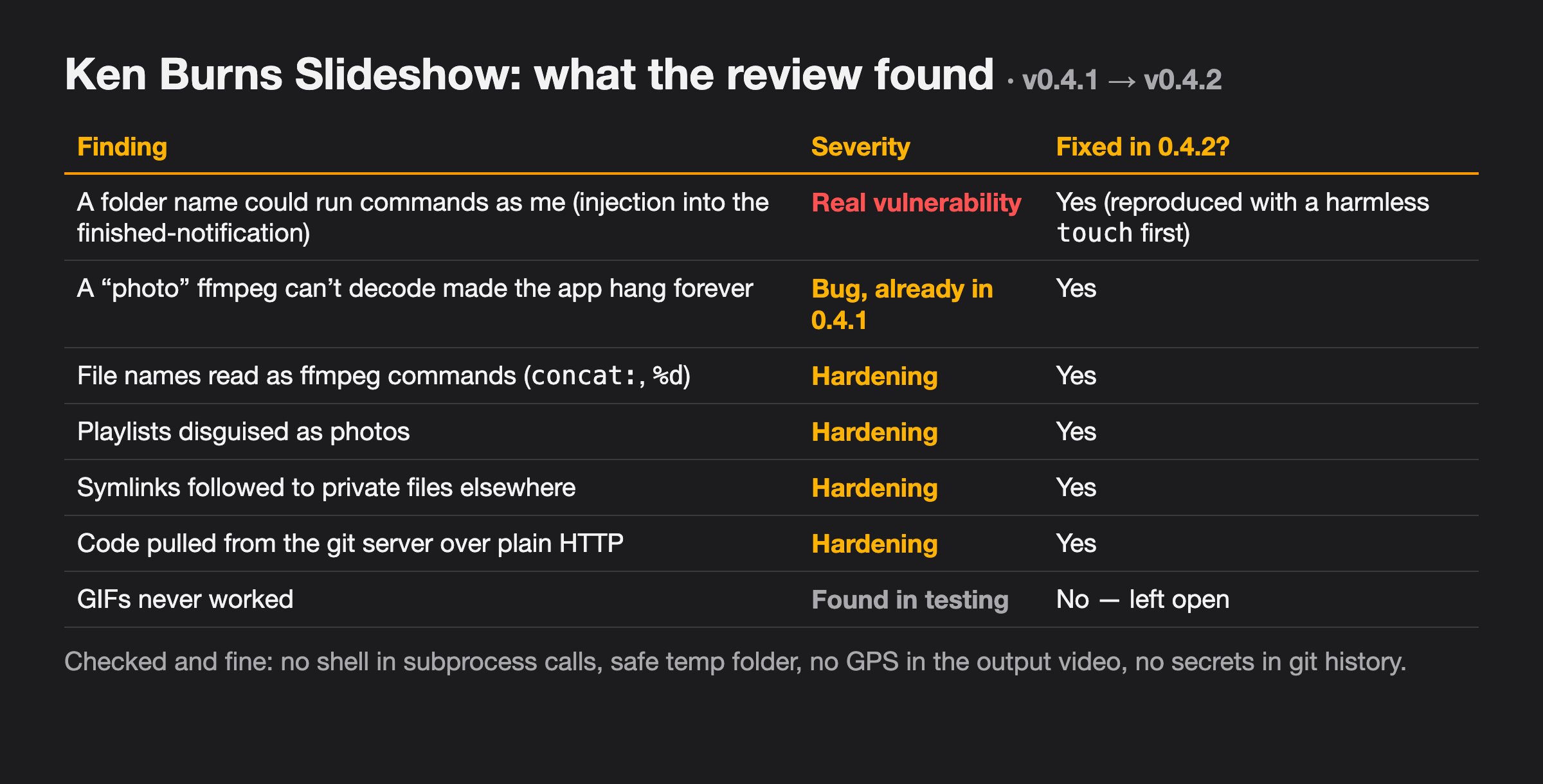
The real one: a folder name could run commands as me. When a movie finishes, the app shows a notification with the movie name and the path of the folder I dropped. The script built that notification by pasting the text into an AppleScript (Apple’s scripting language) command. A folder named with a quote character and a command inside it, say one that came out of a zip somebody sent me, would have been run as code. The session reproduced it with a harmless command that creates a file, so I could see it was real. The fix is to hand the text over as a separate argument instead of pasting it into the command, so it is always treated as text.
The rest were smaller:
- The app could hang forever. A file named like a photo that was really a playlist, or any file the video tool (ffmpeg) could not decode, made it retry endlessly. This bug was already there before the review. Now every photo is test-decoded first and skipped if it fails.
- File names are commands to ffmpeg. A name like
concat:x.pngis treated as an instruction, not a file. The tool now uses full paths and tells ffmpeg to read only plain files. - Symlinks were followed. A symlink (a shortcut to a file somewhere else) in the folder could pull a private photo into a movie I then share. Symlinks are now skipped.
- The code came over plain HTTP. My git server was reachable both ways, and this repo used the unencrypted one. It uses HTTPS now.
- GIFs have never worked. Found while testing, and I left it open for now.
The review also named what was already solid: no shell commands built from text, a safe temp folder, no location data in the finished video, and no secrets in the git history. Knowing what is fine is worth as much as the list of problems.
Two of the first fixes broke things before they worked. Forcing ffmpeg to treat every file as a still image stopped the playlist trick, but a PNG renamed .jpg then hung it the same way, so I kept the file-type detection on and restricted it to a list of picture formats. One ffmpeg option I tried was rejected for most image types, which knocked out PNG, TIFF and the watermark until it was fixed. Both are in the project’s lessons page now. A confident reading of the code is a guess; a test is evidence, which is why that harmless test file mattered.
Adding it to the Claude app
The same rules are also available to the Claude app, packaged by Anthropic as a skill called software-security. I added it there as a new skill, so the chat and desktop side get the same checks as the command line. This was downloaded from the github https://github.com/project-codeguard the skills are at https://github.com/project-codeguard/rules/blob/main/skills/software-security/SKILL.md
Making it part of the harness
A skill I have to remember to ask for is a skill I will forget. So I added it to my AI harness (the standards and tools every session is handed before it writes anything). There is now a house standard, kb_guide("secure_code"), and it does two things:
- It says which skill to load, and loads it before the code is written. Run only at the end, a scan is an audit of code that already exists. Run first, it shapes the code.
- It carries the rules CodeGuard cannot know about my house. Secrets live in Komodo (my container manager) variables, never in git. Code gets fetched over HTTPS. Anything that can be exposed to the internet gets multi-factor login. Text from outside never gets pasted into a script. These came straight out of the Ken Burns review.
The guides that write code now point to it: starting a container project, updating one, the web UI standard, and starting or updating a remote package. If the skill is not installed on the machine, the session has to say so in its summary, because a silent skip reads like a pass.
flowchart LR
  A["Load the skill
before writing"] --> B["Write or change code"]
  B --> C["Apply the skill's rules
+ the house rules"]
  C --> D["Test with bad input,
not just good"]
  D --> E["Record findings
in the project's lessons"]
The step that matters most is the fourth. For every place untrusted text comes in (a filename, a form field, a dropped folder), try a hostile value and see what happens. That is how the folder-name problem became something I could see.
What I would tell you to do
- Read what you install. A skill steers your AI. Check the source, and watch for the look-alikes.
- Load it before the code, not after.
- Ask for evidence. “Rank the findings and prove each one with a harmless test” is a better prompt than “is this secure?”
- It is a layer, not a seal. CodeGuard steers the AI toward safer patterns. It did not replace thinking, and Cisco says so too.
Next time I start a project, the security rules will already be loaded. I will not have to remember, and neither will the AI.
Like the other posts, the first draft was written by an AI from my wiki and log book, then edited by me. The deep version, with the prompts and every mistake, is on my knowledge base.
About the Author

Kevin Cossaboon
A networking profesional located in Northren Virginia, USA. My hobbies are Technology and Photography. Love playing with the latest technology, and will try to post reviews of them. Also love my life long journey of learning to capture light, to trigger emotions, through photography.